The AI video and content studio for your social media and your clients
Multi-scene videos and short films that run for minutes — up to 30 minutes and 180 scenes, with characters that stay the same in every scene. Fix the scene you do not like without rebuilding the video. Post text, images, carousels and PDFs live in the same place: from the panel, or through the API and Claude. Define your own brand voice, or each client's, once; production, approval and publishing all happen in one place.
No credit card required. Free plan includes 60 tokens/month.
Samples made with ClientPoster
Our picks from videos ClientPoster users produced.
-
Müşteri tek bir sahneyi beğenmedi. Bütün videoyu baştan mı üreteceksiniz? 🎬
#clientposter #sosyalmedyaajansi #yapayzeka #aivideo -
Bu emlak videosunda kamera, set ve oyuncu yok. 🎬
#clientposter #sosyalmedyaajansi #yapayzeka #aivideo #emlakvideosu -
Ajansınızın tanıtım videosu: 2 sahne, 20 saniye, çekim yok
#clientposter #sosyalmedyaajansi #yapayzeka #aivideo #tanitimvideosu -
İlk videonuz bizden: 10 saniyelik örnek çiçekçi videosu
#clientposter #sosyalmedyaajansi #yapayzeka #aivideo #kisavideo -
Aynı otel videosu, dört dilde: Türkçe, İngilizce, Almanca, Arapça
#clientposter #sosyalmedyaajansi #yapayzeka #aivideo #turizmpazarlamasi -
Aynı istek, iki marka sesi: sözleri ClientPoster yazdı
#clientposter #sosyalmedyaajansi #yapayzeka #aivideo #markasesi
Videos are shown with the permission of the users who produced them.
Sign in to browse the full marketplaceMinutes-long video and short film
Multi-scene video from a single brief — up to 180 scenes and 30 minutes. Up to 5 characters whose look, personality and voice stay the same from scene to scene. Narrator, location cards, reference images and subtitles.
- Video length 30 minutes at most
- Scenes 180 scenes at most
- Characters 5 consistent in every scene
Example scene strip: each scene is 10 seconds long; up to 180 scenes and 30 minutes. The two characters are the same in every scene.
Scene-by-scene editing
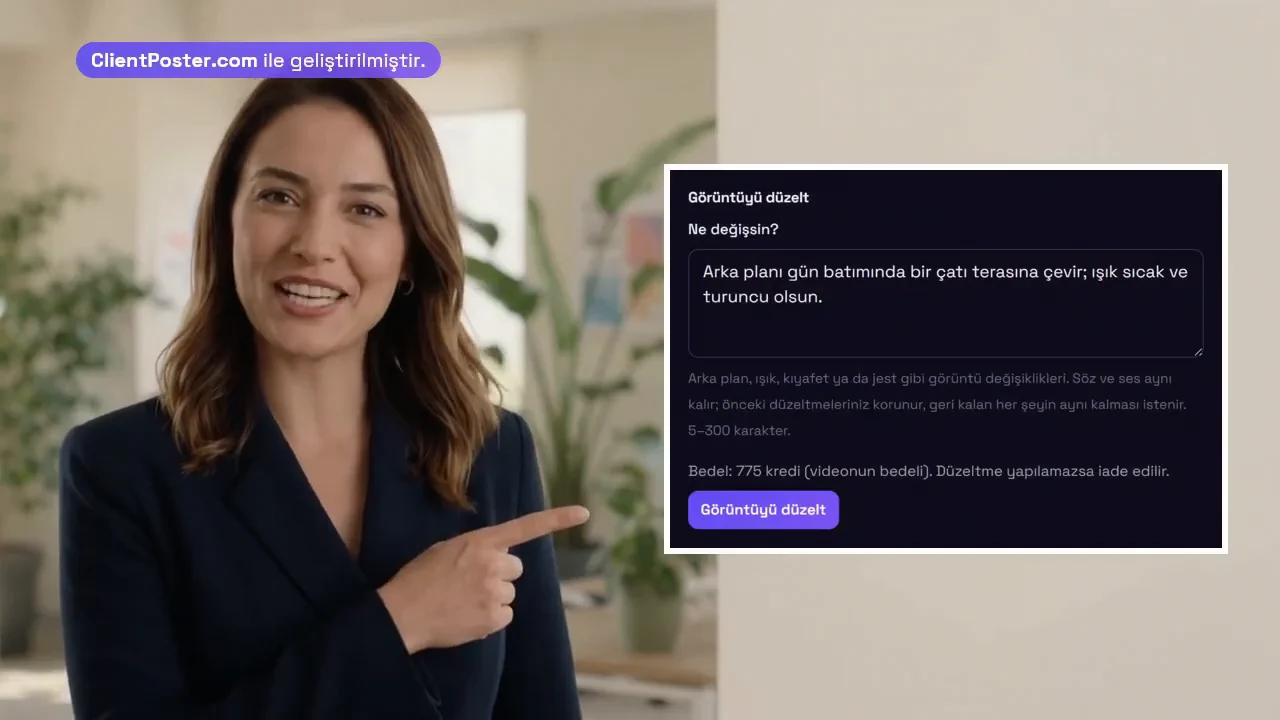
After delivery, correct a single scene with AI, apply the same correction to the whole video, go back to a previous version, trim it, change its subtitles or regenerate it — the rest of the video stays as it is.
Example from our product video: before, the presenter is in an office; after a one-sentence correction, the same person, outfit and pose are on a rooftop terrace at sunset.


-
Fix it with AI
Describe what should change; only that scene is produced again.
-
Apply to the whole video
Apply the same correction to every scene in one go.
-
Go back to a previous version
Not happy with the result? Restore the scene's previous version.
-
Trim
Trim the start and end of a scene by hand, or let silences be trimmed automatically.
-
Fix the subtitles
Change subtitle lines without producing the video again.
-
Regenerate a scene
Produce a scene again when you are not happy with it or it failed; the rest of the video stays as it is.
Content in every format
Ten content types, from plain text to carousels, stories and videos of up to 30 minutes. Each type is listed with its own token cost, so you see what you will spend before you generate.
-
Text only
Post text only; no image or video. For announcements, opinion pieces and short updates.
-
Single image
A single image together with the text. The most common post type.
-
Multi image
Several images in one post; each image has its own prompt, size and name.
-
Carousel
Sequential slides: an intriguing opener, one idea per slide, a call to action at the end.
-
Document
A LinkedIn document post: a 3–10 page PDF, each page a slide.
-
Short video
A video of about 10 seconds; for Reels, Shorts and TikTok.
-
Long video
A video of 20 seconds or more made scene by scene; you describe each scene or the AI writes it.
-
Story
A single vertical 9:16 image with a short text; for Instagram and Facebook stories.
-
Poll
A question with a 2–4 option poll, with a post text introducing it.
-
Link share
A post introducing a page; the link is added as a card, the page is not visited.
Automation with the API and Claude
Tell Claude to prepare a 60-second product video for your brand or one of your clients: with the ClientPoster connector Claude tells you the price first, produces it, fixes a scene and, if needed, sends the content for approval. No API key needed; developers also get a public REST API and an OpenAPI definition.
-
1
Add the connector
In Claude: Customize → Connectors → Add custom connector; on every plan, including the free plan.
-
2
Grant access with your own account
Sign in to ClientPoster and choose what Claude may do; no API key needed.
-
3
Ask in plain language
Claude previews the price, starts the job and waits for the video; it can also fix a scene or send the content for approval.
For client X, prepare a 60-second, 6-scene horizontal product video for LinkedIn; tell me the price first and generate it only if I approve.
It makes these calls to the ClientPoster API, in order:
GET   /api/v1/musteriler
GET   /api/v1/icerik/bedel/text/1
POST  /api/v1/icerik/uret
GET   /api/v1/icerik/CONTENT_ID/detay
POST  /api/v1/icerik/{icerikId}/video-sahnesi/duzelt
POST  /api/v1/onay/talep
Brand voice, your own copy and client approval
Content that knows the brand voice
For your own brand or each client you define tone, audience, keywords and banned words. A four-step wizard reads that guide and produces at least three different opening variants; you pick the one you like.
Or write it yourself
AI is never mandatory. Type your content straight into the panel and carry on with scheduling and publishing in the same system; manually written content costs no tokens.
Client approval without sign-in
Your client approves or requests changes through a single link, with no account. Every approval is recorded with a timestamp.
Who it is for
Social media agencies
You run dozens of client accounts and each one wants a different brand voice. Client cards, brand guides and content history live in one place.
Freelance specialists
You work solo and most of your time goes into writing. Define the brand guide once and bring production down to minutes.
Brands that run their own accounts
You run your social media with your own team. Define your brand voice once; video, images and post text are prepared in one place, and approval links, comments and revisions stay on record.
YouTubers and video creators
Produce minutes-long multi-scene videos and Shorts for your channel; characters stay the same in every scene, and you fix the scene you do not like without rebuilding the video. Download the video and upload it to your channel.
Individual users
You are growing your own account and personal brand. Write your post with AI or by yourself and share it on your LinkedIn profile right away or at the time you schedule. Start free.
How it works
-
1
Add the brand
Add your own brand or a client and define the brand guide: tone, audience, keywords and banned words.
-
2
Connect the social account
Connect a LinkedIn, Instagram, Facebook, TikTok or YouTube account through the platform own authorization screen. Access tokens are stored encrypted and refreshed before they expire.
-
3
Prepare the content
Generate it with the four-step wizard or write it yourself. The wizard reads the brand guide and offers at least three different opening variants.
-
4
Schedule, and send for approval if needed
Place it on the calendar; if it needs approval, send your client or manager a sign-in-free approval link. Approvals, revisions and comments stay on record.
-
5
Publish automatically
Approved content is published on the relevant social account when its time comes and the result report arrives by e-mail.
Frequently asked questions
Do I have to use AI?
No. You can type your content straight into the panel and continue with scheduling and publishing in the same system. Content you write yourself costs no tokens.
What are tokens and what do they pay for?
Tokens only pay for AI generation. Every content type has its own cost and you see it before you generate: a text-only post is 12 tokens, a post with an image is 60. The free plan gives 60 tokens a month.
Does my client need an account to approve?
No. Your client receives a time-limited, unguessable approval link; they click to approve or request changes. No account needed.
Which platforms do you support?
LinkedIn, Instagram, Facebook, TikTok and YouTube. Each account is connected through its own platform authorization screen; access tokens are stored encrypted and refreshed before they expire.
Do you store my card details?
No. Payment is taken on the payment provider own screen; your card details never reach ClientPoster servers and are never stored by us.
Who owns my clients data?
You do. For the client data an agency enters, we are the data processor and the agency is the controller; we store and process it only on your instructions. Details are in the privacy policy.
How long can a video be?
Multi-scene videos run up to 30 minutes and 180 scenes; every scene is 10 seconds long and you choose the number of scenes. The scene limit may depend on your plan; you see the price before you generate.
Can I change just one scene of a video?
Yes. After delivery you can correct a single scene with AI, apply the same correction to the whole video, trim it, change its subtitles, regenerate it or go back to a previous version; the rest of the video is not regenerated.
Can I use ClientPoster with Claude or another AI assistant?
Yes. On paid plans you create an API key and give Claude (Claude Code or the Claude API) the key, our llms-full.txt file for AI tools and the OpenAPI definition; then you ask it in plain language to produce videos, images and text for your clients, fix scenes and send content for approval. Details are in the developer guide.
Who publishes the posts?
ClientPoster does. Approved content is published on your client's connected LinkedIn account right away or at the time you schedule, and the post link stays on the content's record. Instagram, Facebook, TikTok and YouTube are coming soon, as platform approvals complete.
The video and content studio for your social media
Open your account in minutes, add your brand or your first client and produce your first video.
No credit card required. Free plan includes 60 tokens/month.